

FREQUENTLY ASKED QUESTIONS

What is IPTV?

IPTV stands for television content delivered over high-speed Internet Protocol networks.
Understand the difference between streaming subscriptions and media players, and what you need to get started.

What is IPTV and how does it work?

IPTV (Internet Protocol Television) delivers live TV feeds and on-demand movies over the internet rather than traditional cable lines, satellite dishes, or aerial antennas. To use this service, you need broadband internet (minimum 25–50 Mbps recommended for 4K), a compatible screen (Smart TV, streaming stick, phone, or computer), a media player application, and active subscription credentials. IPTV refers to the digital transmission method, rather than a specific static bundle of channels.

What is the difference between Live TV and On-Demand VOD?

Live TV broadcasts in real-time according to the network's official program schedule. VOD (Video on Demand) consists of movie archives and complete TV series seasons that you can start, pause, and resume whenever you wish. The Electronic Program Guide (EPG) displays schedules and program descriptions. Explore our complete Channel and VOD lineup.

Is an IPTV player application the same as a subscription?

No. A player application (like TiviMate, IPTV Smarters Pro, or XCIPTV) is playback software installed on your hardware. Your IPTV subscription provides the server address, channels, and video feeds that the player decodes. Check our Supported Devices & Apps Guide to find the best player for your television, and follow our Quick Setup Guide for M3U and Xtream login steps.

Can I test the stream before purchasing a package?

Yes. Every new customer can request a free 24-hour test pass on WhatsApp. No credit card or billing details are required. Test server fluidity, sports channels, and video performance on your own screen and home network.

On how many screens can I stream simultaneously?

Standard packages include one simultaneous active stream. You can install your subscription across multiple household devices and watch by closing playback on the first screen before opening on another. If your household requires multi-room simultaneous viewing, ask our WhatsApp support about 2-device or 3-device options.

Does the subscription renew automatically?

No. You select a fixed pass for 3, 6, 12, 24, or 36 months. Our Pricing Table shows the transparent total payment in USD. Plans never auto-rebill your card. To renew, simply reach out before your expiration date. Learn more in our Order & Renewal Terms.

What hardware and software do I need to begin?

You need a compatible streaming screen (Smart TV, Amazon Firestick, Apple TV, Android box, iPhone, Android phone, or PC), a supported media player application, and a broadband internet connection. We provide full setup assistance for M3U links and Xtream Codes API.

How can I confirm my favorite sports and regional channels?

Send your requested channel names or sports networks to our WhatsApp support team. We will verify real-time server availability for your specific channels. Lineups are actively maintained and updated every 24 hours.

Are all 35,000+ channels delivered in native 4K UHD?

Channels are delivered in their highest native studio broadcast quality. Premium sports, major cinematic channels, and special event PPV feeds stream in pristine 4K UHD and 60fps Full HD, while regional and legacy feeds stream in crisp 1080p and 720p HD.

Do I need to enter payment details to receive a free trial?

No payment card or billing information is required for the 24-hour trial. Trials are provisioned instantly via WhatsApp so you can evaluate stream performance with complete peace of mind.

Is the third-party player license fee covered in the plan?

Independent player software licenses (such as TiviMate Premium or IBO Player activation) are separate products handled directly by their respective application developers. Many excellent players also offer completely free versions.

How do I receive technical assistance if a stream freezes?

Message our WhatsApp team with your device model, player name, and the visible error notice. Avoid sharing private passwords. Follow our step-by-step diagnostic checklist on our Troubleshooting Support Page.

Remote control and notepad near TV: What is IPTV practical guide illustration.
Evaluate real-world viewing ergonomics and network throughput on your primary screen before committing.

What is the Difference Between IPTV and On-Demand Streaming?

Traditional on-demand platforms (like Netflix or Prime) host static pre-recorded video files. IPTV replicates complete television distribution, delivering linear real-time television feeds—including live stadium sports, 24/7 breaking news broadcasts, and pay-per-view events—alongside extensive on-demand film and series libraries.

When assessing whether IPTV fits your household, consider your viewing priorities: Do you want live game day coverage without regional blackouts? Do you want to flip through live channels using a TV remote, or select full on-demand film releases? IPTV delivers both experiences through a single unified playlist.

What is an IPTV Playlist?

An IPTV playlist (usually delivered as an M3U link or configured via Xtream API) acts as an organized digital roadmap. It tells your media player software where to locate live streams, channel logos, and Electronic Program Guide data across high-speed edge distribution servers. Downloading a playlist does not mean video files are saved to device storage; active broadband is required for playback.
Which Account Credentials Belong Where?

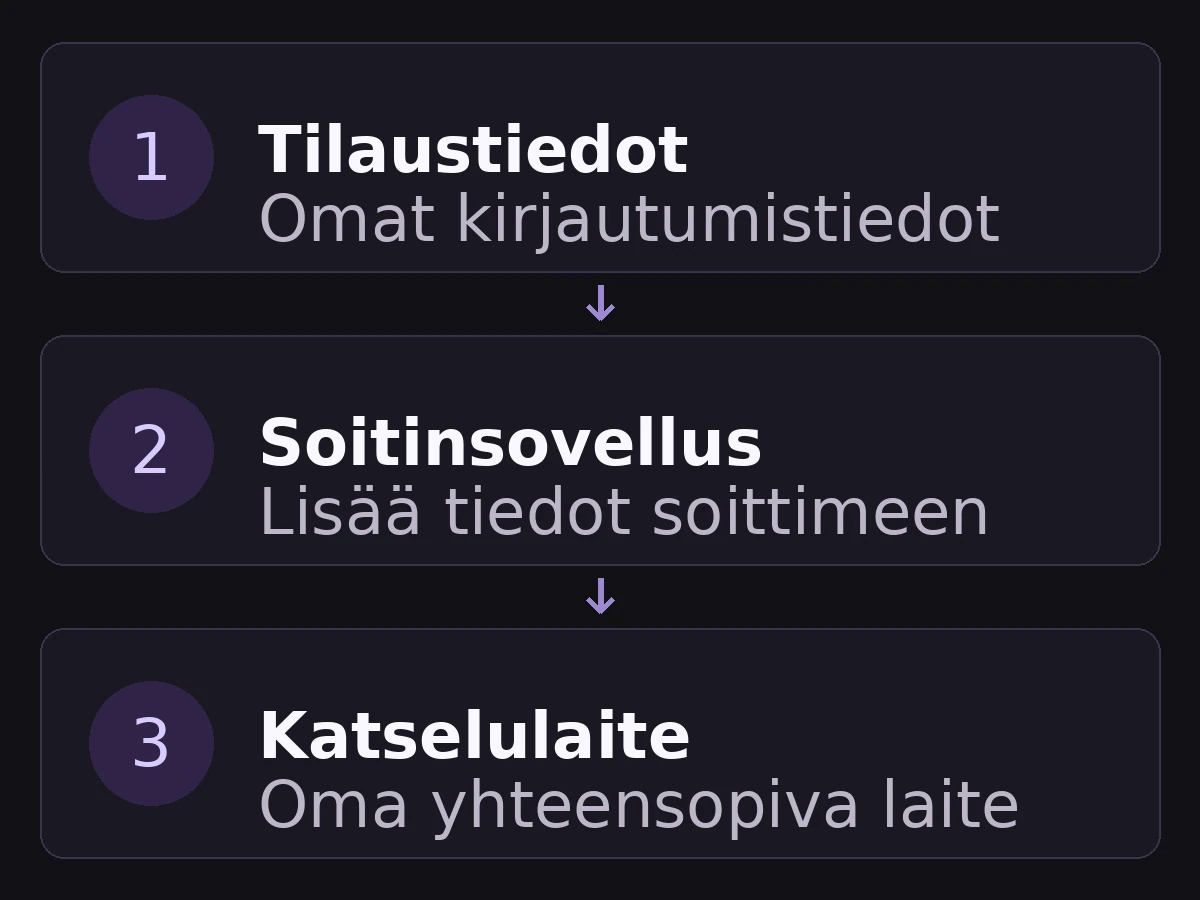
Beginners often confuse device store accounts, third-party player accounts, and IPTV streaming service credentials. Your Google Play or Apple ID manages software downloads. A player app account manages app skin settings. Your IPTV subscription credentials (Server URL, Username, and Password) unlock the actual live TV channels and movie streams.

Getting started with IPTV diagram: subscription credentials, player application, and compatible screen.
IPTV Architecture: Your subscription credentials are input into your player application, running on your compatible device.

When setting up, remember: a 4K television panel cannot upscale a standard-definition video stream into true 4K, and a recording button inside an app does not function unless the backend stream source supports catch-up caching. Our Quick Setup Guide provides exact instructions for entering credentials safely.

Player Software License vs. Content Subscription

If your device app store shows an app purchase completed but channel lists are empty, verify your receipts: you may have paid for the player software without yet connecting your IPTV streaming subscription. Both components are required for live viewing.

Why Does Internet Work While Playback Stalls?

Browsing a webpage or sending text messages consumes negligible data and tolerates latency spikes. Continuous 4K video streaming demands a steady, uninterrupted data pipe with zero packet loss. Wi-Fi signal interference from thick walls or neighboring routers can cause momentary buffering even when speed tests appear fast.

Connect your TV or streaming stick via Ethernet cable whenever possible. If using Wi-Fi, connect to your router's 5GHz band rather than congested 2.4GHz frequencies. Change one network parameter at a time to identify the root cause systematically.

Do I Need a New TV or an External Streaming Box?

Examine your current television before buying new hardware. If your TV supports popular players like IBO Player or Smarters Pro directly in its native app store, no external equipment is necessary. If your television runs a restricted operating system with sluggish app support, an affordable streaming stick (such as an Amazon Fire TV Stick 4K) upgrades any screen instantly.

Consult our Supported Devices & Apps Guide before purchasing new equipment, or ask our WhatsApp team for personalized recommendations based on your home setup.

Have Questions? Chat Directly with Us.

Open WhatsApp Chat
WhatsApp